Word Scramble Game in JavaScript: Step-by-Step Tutorial
If you have ever played a word game, you already know the idea: the letters of a word are mixed up and you have to put them back in the right order. In this tutorial you will build a word scramble game in JavaScript using nothing but HTML, CSS and vanilla JavaScript — no libraries, no frameworks, no build tools. Whether you call it a word scramble, a jumbled words game or a word unscrambler, the idea is the same. By the end you will have a playable word scramble game with hints and a timer: 15 words in three difficulty tiers, a 30-second countdown for every word, three hints, a skip button and a score that rewards fast, hint-free answers.
Along the way you will learn the part that most quick tutorials get wrong: how to shuffle the letters of a word in JavaScript properly with the Fisher-Yates algorithm, and how to guarantee that the scrambled word is never identical to the original. You can type everything into the free WSNCode online code editor as you follow along, or jump straight to the live version further down.
Where the Idea Comes From: Word Unscramble Adventure
This tutorial was inspired by Word Unscramble Adventure, a community project by Ajwa Fatima that is one of the trending projects on the WSNCode Explore page. Her version is a much bigger game than the one we are building. According to its source code it has 10,000 levels split into four difficulty tiers by word length (4 letters, 5–6 letters, 7–8 letters and 9 or more letters), three hints, a five-point penalty for skipping, points that grow with the length of the word, and background music and sound effects that are generated with the Web Audio API instead of audio files.
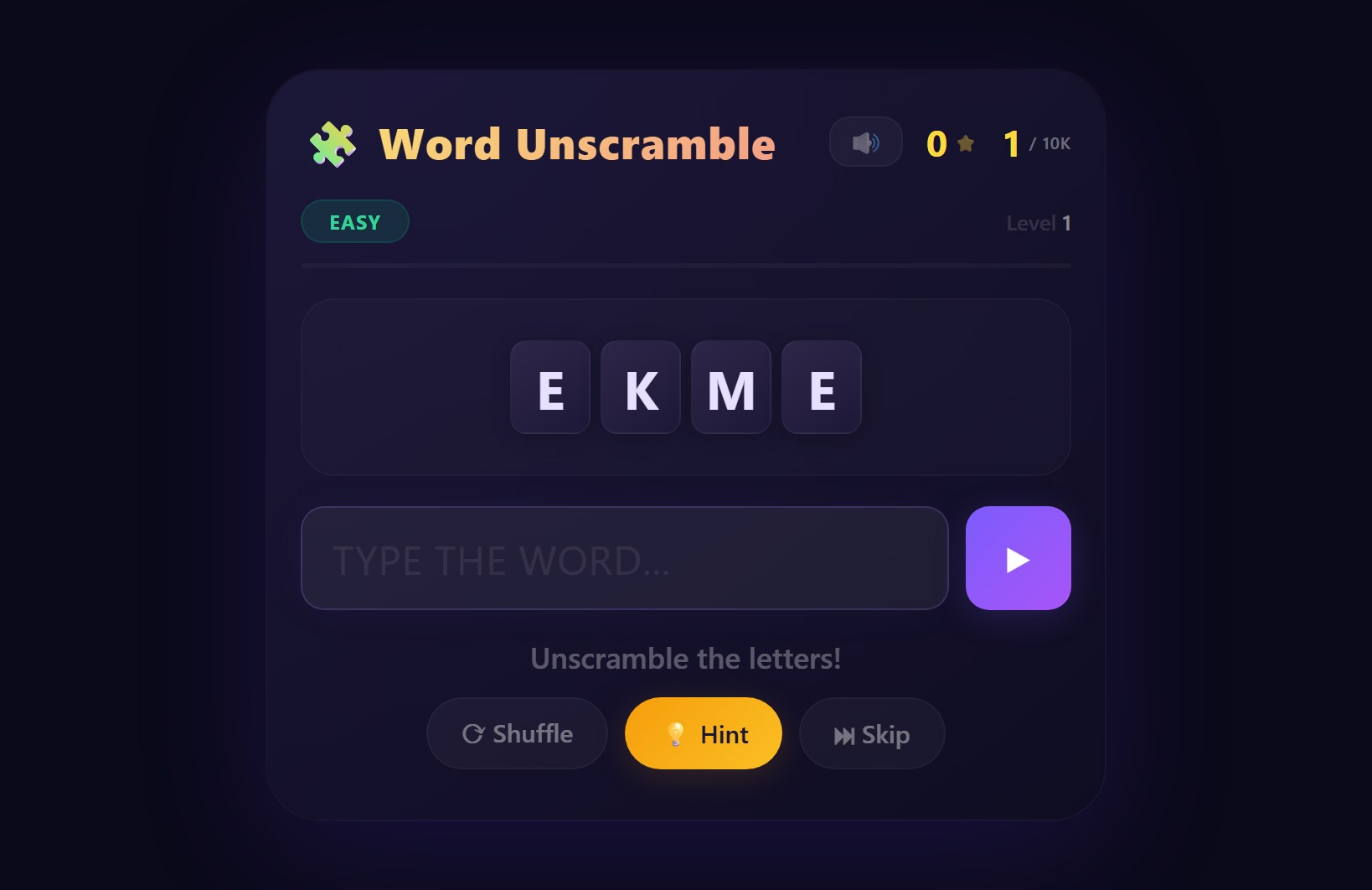
If you want to see where a word scramble game can end up, open the trending projects on Explore and play it first. The code in this article is written from scratch: it is a small teaching version that focuses on the core mechanics — shuffling, checking answers, scoring, hints and a timer — so that every line is easy to understand and change.
What You'll Build: A Word Scramble Game in JavaScript
Here is what the finished game does:
- Plays through 15 words in three tiers: five 4-letter words, five 5-letter words and five words with 7 or 8 letters. The order inside each tier is random, so no two games are the same.
- Shows the scrambled letters as tiles. You type your answer into a text box and press Enter (or the Check button).
- Gives you a 30-second countdown for every word. When it hits zero the word is revealed and the game moves on.
- Lets you use three hints per game. Each hint reveals the next letter from the start of the word and costs 10 points.
- Has a Shuffle button to re-mix the tiles and a Skip button that costs 5 points.
- Scores each correct answer as 10 points per letter, plus the seconds left on the clock, minus any hint penalty (with a minimum of 5 points).
- Ends with a final score and a Play again button.
How a Word Scramble Game Works
Before writing code it helps to see a word scramble game built with HTML, CSS and JavaScript as a simple loop. It needs four things:
- A word list to pick from.
- A scramble function that returns the same letters in a different order.
- Game state: the current word, the score, the time left and how many hints are left.
- Event handlers for the buttons and the answer box.
The loop is: load a word, scramble it, draw the tiles, start the timer, wait for the player, end the level (correct answer, skip or timeout), then load the next word. Every function in the rest of this tutorial is one piece of that loop. If you have read our guide to JavaScript array methods, you will recognise several of them here: flatMap, spread syntax and join do a lot of the work.
Step 1: The HTML Structure
The markup is small on purpose. Everything the game needs to update — the level counter, the score, the timer, the tiles and the message — has an id so JavaScript can find it. The answer box lives inside a <form>, which gives us the Enter-key behaviour for free, and the tiles container has aria-live="polite" so screen readers announce new words. The Play again button starts hidden with the hidden attribute. If you are still getting comfortable with how the three languages fit together, read HTML, CSS and JavaScript Explained first.
<div class="game-wrap">
  <h1>Word Scramble</h1>
  <p class="stats">
    Word <span id="level">1/15</span> ·
    Score <span id="score">0</span> ·
    Time <span id="timer">30</span>s
  </p>
  <div id="tiles" class="tiles" aria-live="polite"></div>
  <form id="guess-form">
    <input id="guess" type="text" autocomplete="off" placeholder="Type the word" />
    <button type="submit">Check</button>
  </form>
  <p id="message" class="message"></p>
  <div class="buttons">
    <button id="shuffle" type="button">Shuffle</button>
    <button id="hint" type="button">Hint (3)</button>
    <button id="skip" type="button">Skip</button>
  </div>
  <button id="restart" type="button" hidden>Play again</button>
</div>
Step 2: Styling the Tiles with CSS
The CSS gives the game a dark card in the middle of the page and turns each letter into a rounded tile. The .tiles container is a flex row with a min-height, so the layout does not jump when the tiles are cleared between words. The .message class has two colour variants, good and bad, that JavaScript switches on to show right and wrong feedback. Nothing here is specific to word games, so feel free to change the colours and sizes. If flexbox is new to you, our complete CSS flexbox guide explains display: flex, gap and justify-content with easy examples.
body {
  margin: 0;
  min-height: 100vh;
  display: flex;
  justify-content: center;
  align-items: center;
  background: #0f172a;
  color: #e2e8f0;
  font-family: system-ui, sans-serif;
}
.game-wrap {
  width: 340px;
  padding: 24px;
  text-align: center;
  background: #1e293b;
  border-radius: 16px;
}
h1 { margin: 0 0 8px; font-size: 26px; }
.stats { margin: 0 0 20px; color: #94a3b8; font-size: 14px; }
.tiles {
  display: flex;
  justify-content: center;
  gap: 8px;
  min-height: 52px;
  margin-bottom: 20px;
}
.tile {
  width: 42px;
  height: 48px;
  line-height: 48px;
  font-size: 24px;
  font-weight: 700;
  text-transform: uppercase;
  background: #334155;
  border-radius: 8px;
}
#guess-form { display: flex; gap: 8px; }
input {
  flex: 1;
  padding: 10px;
  font-size: 16px;
  border: 2px solid #475569;
  border-radius: 8px;
  background: #0f172a;
  color: inherit;
}
button {
  padding: 10px 14px;
  font-size: 15px;
  font-weight: 600;
  border: none;
  border-radius: 8px;
  background: #38bdf8;
  color: #0f172a;
  cursor: pointer;
}
.buttons { display: flex; justify-content: center; gap: 8px; }
.buttons button { background: #475569; color: #e2e8f0; }
.message { min-height: 24px; margin: 14px 0; }
.message.good { color: #4ade80; }
.message.bad { color: #f87171; }
#restart { margin-top: 16px; }
Step 3: The Word List and Game State
Now the JavaScript. The word list is an array of three arrays, one per difficulty tier. Later we will shuffle each tier separately and join them with flatMap, which gives a queue of 15 words that gets harder as you play and never repeats a word. The constants at the top control the rules of the game, so you can make it easier or harder by changing a single number. After the constants we grab every element we will need, and finally declare the state variables. They are declared with let and no value because startGame() will set them.
const TIERS = [
  ['code', 'byte', 'loop', 'node', 'game'],
  ['array', 'style', 'event', 'class', 'input'],
  ['browser', 'network', 'program', 'variable', 'element']
];
const TIME_LIMIT = 30;
const MAX_HINTS = 3;

const levelEl = document.getElementById('level');
const scoreEl = document.getElementById('score');
const timerEl = document.getElementById('timer');
const tilesEl = document.getElementById('tiles');
const formEl = document.getElementById('guess-form');
const guessEl = document.getElementById('guess');
const messageEl = document.getElementById('message');
const shuffleBtn = document.getElementById('shuffle');
const hintBtn = document.getElementById('hint');
const skipBtn = document.getElementById('skip');
const restartBtn = document.getElementById('restart');

let queue, levelIndex, score, hintsLeft, timeLeft, timerId;
let currentWord, revealed, locked;
Step 4: Shuffle the Letters of a Word in JavaScript (Fisher-Yates)
This is the heart of the game. To scramble a word, we first turn it into an array of letters with word.split(''), shuffle that array, and glue it back together with join(''). The shuffle itself is the Fisher-Yates shuffle in JavaScript (also known as the Knuth shuffle):
// Fisher-Yates: walk backwards and swap each item with a random
// item at or before it. Returns a new array.
function shuffle(items) {
  const copy = [...items];
  for (let i = copy.length - 1; i > 0; i--) {
    const j = Math.floor(Math.random() * (i + 1));
    [copy[i], copy[j]] = [copy[j], copy[i]];
  }
  return copy;
}
Here is what happens, step by step:
- We copy the array with
[...items]so the original stays untouched. - We start at the last position and walk backwards to position 1.
- At each position
iwe pick a random indexjbetween0andi, includingi. That+ 1insideMath.random() * (i + 1)matters: it allows an item to stay where it is. - We swap the two items with destructuring assignment,
[a, b] = [b, a].
Each of the possible orderings of the letters is equally likely, which is exactly what you want from a shuffle. The same function works on any array, so we will also use it to randomise the word order inside each tier.
The Shuffle Bug Almost Everyone Copies
If you search for how to shuffle an array in JavaScript, you will find a one-liner that looks tempting:
function badShuffle(items) {
  return [...items].sort(() => Math.random() - 0.5);
}
It is short, it runs, and the results look random at a glance. But a comparison function that returns a random number is not a valid comparison function, so the order you get depends on how the browser's sorting algorithm happens to work and not only on chance. You can measure the problem yourself. This small test shuffles the three letters a, b, c 60,000 times and counts how often each of the six possible orders appears:
function countResults(shuffleFn, runs = 60000) {
  const counts = {};
  for (let i = 0; i < runs; i++) {
    const key = shuffleFn(['a', 'b', 'c']).join('');
    counts[key] = (counts[key] || 0) + 1;
  }
  return counts;
}

console.log(countResults(shuffle));
console.log(countResults(badShuffle));
When I ran it in Node.js v24.15.0, this was the output:
Fisher-Yates:  abc 9944   acb 10041  bac 10036  bca 10002  cab 9990   cba 9987
sort(random):  abc 22546  acb 3680   bac 7512   bca 3687   cab 3802   cba 18773
With a fair shuffle each order should show up roughly 10,000 times (60,000 divided by 6), and Fisher-Yates lands very close to that. The sort-based version puts abc first about 22,500 times and produces acb only about 3,700 times. The exact numbers change every run and depend on the JavaScript engine, so run the test yourself, but the lopsidedness is the point. For a word game it means some scrambles would show up far more often than others.
Step 5: Make Sure the Scrambled Word Is Never the Original
A shuffle is allowed to return the original order. With a 4-letter word that has all different letters, there is a 1 in 24 chance of it happening; for a word with a repeated letter such as loop it is 2 in 24. An unscrambled “puzzle” is a bad game, so the scramble function shuffles again until the result is different:
// Shuffle the letters, but never hand back the original word.
function scramble(word) {
  const letters = word.split('');
  if (new Set(letters).size < 2) return word; // nothing to rearrange
  let result;
  do {
    result = shuffle(letters).join('');
  } while (result === word);
  return result;
}
The do...while loop always runs once, and repeats only when the shuffle handed back the original word. The guard before it is important: if a word consists of one repeated letter, like aaa, every arrangement is identical to the original and the loop would never finish. new Set(letters).size counts the distinct letters, so anything below 2 is returned as it is. All the words in our list have at least two different letters. As a check I ran scramble 200,000 times for each of 18 words, including tricky ones like aab, ab and letter, and it never returned the original word and always returned the same letters.
Step 6: Rendering Tiles, Messages and Stats
Three small helper functions keep the rest of the code tidy. renderTiles clears the container and creates one <span class="tile"> per letter. Using textContent instead of innerHTML for the letters is a good habit: the text is never treated as markup. setMessage writes feedback and switches the colour class, and updateStats refreshes the counters and the number of hints left on the button.
function renderTiles(text) {
  tilesEl.innerHTML = '';
  for (const letter of text) {
    const tile = document.createElement('span');
    tile.className = 'tile';
    tile.textContent = letter;
    tilesEl.appendChild(tile);
  }
}

function setMessage(text, type = '') {
  messageEl.textContent = text;
  messageEl.className = 'message ' + type;
}

function updateStats() {
  levelEl.textContent = levelIndex + 1 + '/' + queue.length;
  scoreEl.textContent = score;
  hintBtn.textContent = 'Hint (' + hintsLeft + ')';
}
Step 7: The Countdown Timer
The timer uses setInterval to run a function once per second. It resets timeLeft to the time limit, shows it, and every second counts down by one. When it reaches zero the level ends without points and the word is revealed. The first line, clearInterval(timerId), is not optional: without it, every new word would start another interval while the old one was still running, and the clock would tick faster and faster. Because timeLeft is a shared variable, the scoring code in Step 9 can read it to give a time bonus.
function startTimer() {
  clearInterval(timerId);
  timeLeft = TIME_LIMIT;
  timerEl.textContent = timeLeft;
  timerId = setInterval(() => {
    timeLeft--;
    timerEl.textContent = timeLeft;
    if (timeLeft <= 0) {
      endLevel("Time's up! The word was " + currentWord.toUpperCase() + '.', 'bad');
    }
  }, 1000);
}
Step 8: Loading Levels and Ending Them
These functions move the game forward. loadLevel picks the current word from the queue, resets the revealed-letters counter for this word, draws the scrambled tiles, clears the answer box and starts the timer. endLevel is the single place where a word finishes, whether the player answered correctly, skipped or ran out of time: it stops the timer, disables the input, shows a message and schedules nextLevel after 1.5 seconds. The locked flag is set there too. It stops the player from scoring twice by pressing Enter again during that short pause, or from using a hint on a finished word. startGame builds the queue with flatMap and our Fisher-Yates shuffle, so each tier is randomised separately but the tiers stay in order.
function loadLevel() {
  currentWord = queue[levelIndex];
  revealed = 0;
  locked = false;
  renderTiles(scramble(currentWord));
  guessEl.value = '';
  guessEl.disabled = false;
  guessEl.focus();
  setMessage('Unscramble the letters!');
  updateStats();
  startTimer();
}

function endLevel(text, type) {
  locked = true;
  clearInterval(timerId);
  guessEl.disabled = true;
  setMessage(text, type);
  setTimeout(nextLevel, 1500);
}

function nextLevel() {
  levelIndex++;
  if (levelIndex >= queue.length) {
    showResult();
  } else {
    loadLevel();
  }
}

function showResult() {
  tilesEl.innerHTML = '';
  levelEl.textContent = queue.length + '/' + queue.length;
  setMessage('All ' + queue.length + ' words done! Final score: ' + score, 'good');
  restartBtn.hidden = false;
}

function startGame() {
  queue = TIERS.flatMap(words => shuffle(words));
  levelIndex = 0;
  score = 0;
  hintsLeft = MAX_HINTS;
  restartBtn.hidden = true;
  loadLevel();
}
Step 9: Checking Answers and Scoring
The form's submit handler compares the guess with the current word. We call preventDefault() so the page does not reload, then trim() and toLowerCase() the guess so “Code ” and “code” both count. A correct answer earns 10 points per letter plus the seconds left, minus 10 points for each hint used on this word, and never less than 5. A wrong answer keeps the level running, shows a message and selects the text in the box so the player can type over it.
formEl.addEventListener('submit', event => {
  event.preventDefault();
  if (locked) return;
  const guess = guessEl.value.trim().toLowerCase();
  if (!guess) return;
  if (guess === currentWord) {
    const points = Math.max(5, currentWord.length * 10 + timeLeft - revealed * 10);
    score += points;
    updateStats();
    endLevel('Correct! +' + points + ' points', 'good');
  } else {
    setMessage('Not quite, try again.', 'bad');
    guessEl.select();
  }
});
Step 10: Hints, Shuffle, Skip and Restart
The last piece wires up the buttons. The Shuffle button simply re-scrambles the current word. The Hint button first checks that the level is not locked, that hints are left and that it would not reveal the whole word, then increases revealed and shows the first letters with underscores for the rest, for example Hint: B R _ _ _ _ _. Skip subtracts 5 points (never going below zero) and reveals the word. Finally startGame() at the bottom kicks everything off.
shuffleBtn.addEventListener('click', () => {
  if (!locked) renderTiles(scramble(currentWord));
});

hintBtn.addEventListener('click', () => {
  if (locked || hintsLeft === 0 || revealed >= currentWord.length - 1) return;
  hintsLeft--;
  revealed++;
  const shown = currentWord.slice(0, revealed).toUpperCase().split('');
  const blanks = Array(currentWord.length - revealed).fill('_');
  setMessage('Hint: ' + [...shown, ...blanks].join(' '));
  updateStats();
});

skipBtn.addEventListener('click', () => {
  if (locked) return;
  score = Math.max(0, score - 5);
  updateStats();
  endLevel('Skipped! The word was ' + currentWord.toUpperCase() + '. (-5 points)', 'bad');
});

restartBtn.addEventListener('click', startGame);

startGame();
Want to play the finished word scramble game? Open it in the WSNCode editor with all the HTML, CSS and JavaScript pre-loaded, then change anything you like.
Try It Live in the WSNCode Editor →Testing Your Word Scramble Game
Games are full of small edge cases, so it is worth testing them on purpose. To check this one I wrote a small Node.js script with a fake page and a virtual clock, so that timers could be fast-forwarded. It plays through all 15 words and checks the parts that are easy to get wrong. You can test the same things by hand in the editor, and a few console.log() calls (see our JavaScript console.log() tutorial) are the quickest way to watch score, timeLeft and hintsLeft change:
- The tiles always contain the same letters as the answer and are never in the original order.
- A wrong answer does not end the level, and pressing Enter twice on a correct answer only scores once.
- The timer does not speed up after several words (the
clearIntervalbug). - Hints stop after three, never reveal the whole word and reduce the points for that word.
- Skip never takes the score below zero, and letting the time run out gives no points.
- After the last word the final score appears and Play again resets the score, the hints and the queue.
Ideas to Extend This Game
Once the basic game works, there is plenty of room to make it your own:
- A bigger word list. Move the words into a separate array or a JSON file, and choose the tier by word length, the way Ajwa Fatima's Word Unscramble Adventure does across thousands of levels.
- A high score. Save the best score with
localStorageand show it next to the current score. - Clues and categories. Store each word with a short clue such as “a JavaScript data type”, and show the clue instead of, or after, the first hint.
- Clickable tiles. Let players tap the tiles to build their answer, which is much friendlier on phones than the keyboard.
- Sound effects. Add short sounds for correct and wrong answers with the Web Audio API, and a mute button.
- Streak bonus. Multiply the points for consecutive correct answers without hints.
- A word of the day. Use the date to choose one word for everybody, so players can compare scores.
- A word unscrambler. Flip the game around and build a solver: sort the letters of a scrambled word with
[...word].sort().join('')and compare the result with the sorted letters of every word in your list. Words with the same sorted letters are anagrams of each other. This is the same trick the tests use to check that the tiles contain the right letters. - Another game. If you enjoyed this one, try the Snake game tutorial next, which introduces the canvas and a real-time game loop.
Frequently Asked Questions
How do I shuffle the letters of a word in JavaScript?
To shuffle letters of a word in JavaScript, split the word into an array with word.split(''), shuffle the array with the Fisher-Yates algorithm (loop from the last index down to 1 and swap each item with a random item at or before it), then join it back together with join(''). Avoid array.sort(() => Math.random() - 0.5), because it does not give every order the same chance.
Why is sort(() => Math.random() - 0.5) a bad way to shuffle?
A random comparison function is inconsistent, so the steps of the sorting algorithm influence the result as much as chance does. In one run of 60,000 shuffles of the letters a, b and c in Node.js, the order abc appeared 22,546 times and acb only 3,680 times, while Fisher-Yates produced each of the six orders about 10,000 times.
How do I make sure the scrambled word is never the same as the original?
Compare the shuffled result with the original word and shuffle again until they are different, using a do...while loop. Skip the loop for words that contain only one distinct letter, such as aaa, because every arrangement is identical and the loop would never end.
How do I add a timer and hints to a word scramble game?
For the timer, start a setInterval that lowers a timeLeft variable every second and ends the level at zero, and call clearInterval whenever a level ends so that timers do not stack. For hints, keep a counter of hints left and a count of revealed letters, show that many letters from the start of the word with underscores for the rest, and subtract points for every hint used.
Wrapping Up
You now have a complete word scramble game in JavaScript: a fair Fisher-Yates shuffle, a scramble that never returns the original word, a countdown timer, hints, skipping and scoring, all in roughly 160 lines of plain JavaScript. Open the finished project in the WSNCode editor, break it, fix it and extend it with the ideas above. If you build something with it, share it, and you might find it among the projects on the Explore page one day.